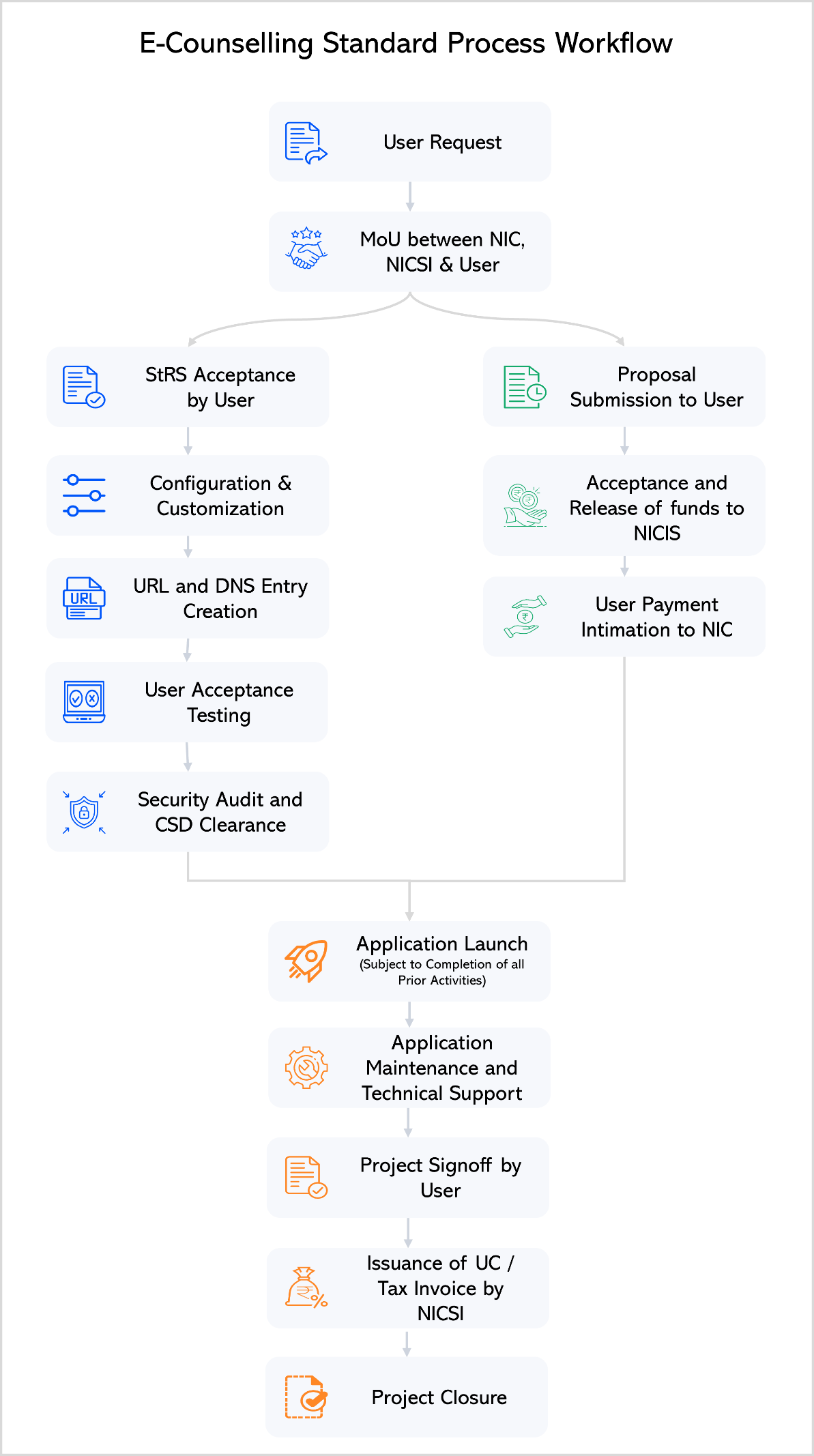





1. Purpose
This Standard Operating Procedure (SOP) lays down the standardized, transparent, and secure process for onboarding Central and State Government Departments, Agencies, and autonomous bodies intending to avail eCounselling and Examination Services from the National Informatics Centre (NIC).
The SOP aims to ensure uniformity, accountability, procedural clarity, and compliance across all NIC eCounselling engagements.
2. Scope
This SOP shall be applicable to:
- Ministries and Departments of the Government of India
- State Government Departments and Counselling Authorities
- Autonomous Bodies, Boards, and Statutory Organizations intending to utilize NIC eCounselling / Examination services
2.1 Examination Services
The scope of Examination Services includes, but is not limited to:
- Online registration and form submission
- Document upload and discrepancy management
- Fee payment and reconciliation
- Admit card generation
- Recorded responses, score cards, and result processing
2.2 Counselling / Admission Services
The scope of Counselling / Admission Services includes:
- Seat matrix preparation and management
- Candidate registration and fee payment
- Choice filling and mock allocation
- Seat allocation and acceptance
- Document verification and allotment letters
- Reporting, admission confirmation, and fee processing
3. Definitions
User Department – Central/State Government department, agency, or body requesting NIC eCounselling Services
PMU (Project Management Unit) – NIC unit responsible for onboarding review, coordination, and monitoring
StRS (Stakeholder Requirement Specifications) – Approved document capturing finalized functional and technical requirements
NICSI – National Informatics Centre Services Incorporated; responsible for financial processing
Onboarding Portal – NIC’s digital platform for submitting and tracking onboarding requests
UAT (User Acceptance Testing) – Formal acceptance testing by User Department prior to application launch
4. Roles and Responsibilities
4.1 User Department
The User Department shall:
- Initiate the onboarding request through the Onboarding Portal
- Provide complete and accurate requirement details
- Approve the Stakeholder Requirement Specifications (StRS)
- Release approved financial payments to NICSI
- Conduct User Acceptance Testing (UAT)
- Issue formal Project Sign-off upon completion
4.2 NIC (eCounselling Division / State Units)
NIC shall:
- Conduct requirement analysis and prepare the StRS
- Prepare and process the Project Proposal
- Configure, customize, test, and deploy the solution
- Provide technical support and application maintenance
- Facilitate project completion and closure activities
4.3 Project Management Unit (PMU), NIC
PMU shall
- Scrutinize onboarding requests for completeness and authenticity
- Record approval, rejection, or hold decisions
- Monitor onboarding progress and compliance with SOP
4.4 NICSI
NICSI shall:
- Generate and issue Proforma Invoices (PI)
- Receive and account for project funds
- Process and issue Utilization Certificates (UC)
5. Onboarding Procedure
5.1 Step 1: Request Initiation by User Department
5.1.1 The User Department shall access the NIC eCounselling Onboarding Portal.
5.1.2 The department shall submit an onboarding request containing:
- Ministry / State / Organization details
- Services required (Examination and/or Counselling)
- Session / Academic Year
- Nodal officer and contact details
- Official request letter on departmental letterhead
5.1.3 The User Department shall verify registered Email and Mobile numbers through OTP authentication.
5.1.4 Upon successful submission, the system shall record the request with “Pending” status and forward it to the PMU for scrutiny.
5.2 Step 2: PMU Scrutiny and Decision
5.2.1 PMU shall examine the request for:
- Authenticity of request letter
- Completeness of information
- Alignment with NIC eCounselling service scope
5.2.2 Based on scrutiny, PMU shall record one of the following decisions:
- Accepted: Secure signup link issued
- Hold: Clarifications sought from User Department
- Rejected: Request closed with recorded reasons
5.2.3 In case of acceptance, a secure, encrypted, and time-bound signup link shall be issued to the User Department.
5.3 Step 3: Submission of Detailed Onboarding Information
5.3.1 Using the signup link, the User Department shall submit detailed information including:
- Examination and/or counselling processes
- Tentative schedules
- Expected applicants and seat capacity
- Participating institutions
- Previous vendor/agency details, if applicable
5.3.2 PMU shall review the submitted information and confirm readiness for detailed requirement discussions.
5.4 Step 4: Requirement Finalization (StRS)
5.4.1 NIC shall engage with the User Department for structured requirement discussions.
5.4.2 Based on mutually agreed scope, NIC shall prepare the Stakeholder Requirement Specifications (StRS).
5.4.3 The User Department shall review and formally approve the StRS.
5.4.4 The approved StRS shall serve as the baseline document for configuration, customization, and testing.
5.5 Step 5: Proposal and Financial Processing
5.5.1 NIC shall prepare the draft Project Proposal in alignment with the approved StRS.
5.5.2 The proposal shall undergo internal approvals within NIC, including HoG and PAC.
5.5.3 NICSI shall generate the Proforma Invoice (PI) and share it with the User Department.
5.5.4 The User Department shall release approved funds to NICSI and formally intimate NIC.
6. Configuration, Customization, and Testing
6.1 NIC shall configure and customize the application strictly as per the approved StRS.
6.2 The application shall undergo:
- Internal validation by NIC
- User Acceptance Testing (UAT) by the User Department
- Mandatory Security Audit
6.3 Successful completion of all testing stages shall be a prerequisite for deployment.
7. Application Deployment
7.1 NIC shall deploy the application on the designated NIC hosting infrastructure (NIC Cloud / Data Centre).
7.2 User access credentials and operational guidelines shall be shared with the User Department.
7.3 The system shall be made live for public use as per the approved launch schedule.
8. Operations and Maintenance
8.1 NIC shall provide ongoing technical support throughout the examination or counselling lifecycle.
8.2 Any operational changes or enhancements shall be managed through PMU with due approvals.
9. Project Completion and Closure
9.1 Upon completion of all activities:
- NIC shall issue Project Completion Intimation
- User Department shall provide formal Project Sign-off
9.2 Based on the sign-off, NICSI shall process and issue the Utilization Certificate (UC).
9.3 The project shall be formally closed in NIC records.